
On how I do my writing
Jumping on the Substack Bandwagon

About a month ago, I posted a little update on my vacation and included an AI-generated image of where I was staying. Well, I’ve included an actual photo of the view below.


It’s pretty wild how much the AI version references the real thing — and yes, the first photo I did take on vacation, but versions of that view already existed in my Google Photos.
Taking a full month off was exactly what I needed. It gave me the chance to dive into books and podcasts that have absolutely nothing to do with my day job, which was such a nice change of pace. That said, I did find myself missing my usual routine. I even caught myself gravitating toward a few work-related podcasts while I was away, but by and large my podcasts and readings were quite vapid, which won’t surprise anyone who knows me IRL.
I originally planned to talk about the OpenAI and Hugging Face (Washington Post gift link) drama today, but Substack rolled out a new feature while I was away that lets people scan content to see if it’s AI-generated. That felt like the perfect cue to pull back the curtain and chat about how I actually write these posts.

Right now, I’m actually using voice typing in Google Docs to write this post. My typical workflow starts with me just talking through my thoughts for as long as I need to. If you know me, you know I like to talk a lot; I’m definitely a verbal processor. So I never start with a written draft—blank pages give me too much anxiety. I can have a million ideas during a conversation, but the second I try to type them out, my brain just freezes. I also struggle to take notes while staying present in a discussion, so I’ve found that processing things out loud works much better for me (and leaning in hard to an auto-notetaking tool like Zoom Notes helps me with remembering what I need to do). Before Google had the voice typing feature, I used to use the speech-to-text on my phone just to get the raw ideas down into a Google Doc.
Once I’ve got that initial brain dump on the page, I use AI models like Gemini (it used to be OpenAI but I have rejected them on a number of grounds) to help clean up the transcript and give it a bit of structure for someone reading. I usually add a task after this to ask the AI model to point out anything it removed from my original dictation, so I can decide whether to put it back in. After that, I spend a lot of time editing manually and rewriting paragraphs.
If you have ideas, please reach out. I’d love to hear what you are thinking or what you’d like me to write about next.
If I’m digging into a topic I’ve heard or read about, I’ll go back to the original source to make sure I’m getting it right. Sometimes I’ll even scan a book chapter with my phone and ask AI to find a specific reference for me; I try to buy physical copies of books I’ve streamed on Spotify to make it easier to find quotes afterward. For articles, I’ll feed a PDF to the AI to find a quote. It’s a bit trickier with audio, but I’ll use a YouTube podcast URL to find the right timestamp, since I find AI models can access YouTube more easily than Spotify. If the podcast isn’t on YouTube, sometimes I just sit there with my phone trying to find quotes—that is completely annoying to do, by the way, but sometimes it’s the only way. I do keep a Google Doc with notes on random ideas I get while listening to a podcast or reading a book, but most of what I consume happens while I’m walking the dog or driving, so the notes aren’t always that helpful.
I also use Grammarly to polish things up, mostly to stop myself from overusing words like “that” and “just.” Plus, I use it alongside Gemini to help me dial in the right tone for each post. Finally, I will hand a post over to my local editor (i.e., my husband) and have him read it occasionally, though that happens much less these days than it did before. My favorite is when my local editor opens a Google Doc to the tab where I’ve done my brain dump, rather than to the tab where I have tagged him and asked him to edit. This is really funny to me because watching him try to edit out all my “and”, “ummm”, “yeah”, and “so” ramblings is hysterical. I should probably let him do that for real one time, just to see how what he creates compares to what the AI and I create; that might be a fun experiment. I’ll sometimes even hand over a post to people other than my local editor so I can get their feedback. When that happens, they’ll comment on the post, and I’ll incorporate those changes. As I’ve said before, I feel it’s extremely important to get outside feedback to make sure my ideas are sound and reflect on what people are thinking and talking about.
Did something I said spark an idea?
So why am I sharing all of this with you? Well, because of the new feature I mentioned above. It gives readers insight into what they are reading and how it was created, and since I know many of you might use it, I wanted to give you the full context for my writing. Being transparent about this is becoming a bit of a trend on the platform, and Substack has even mentioned it in their announcements. I’ve included a screenshot below of how Substack “grades” this post so you know what to expect moving forward.
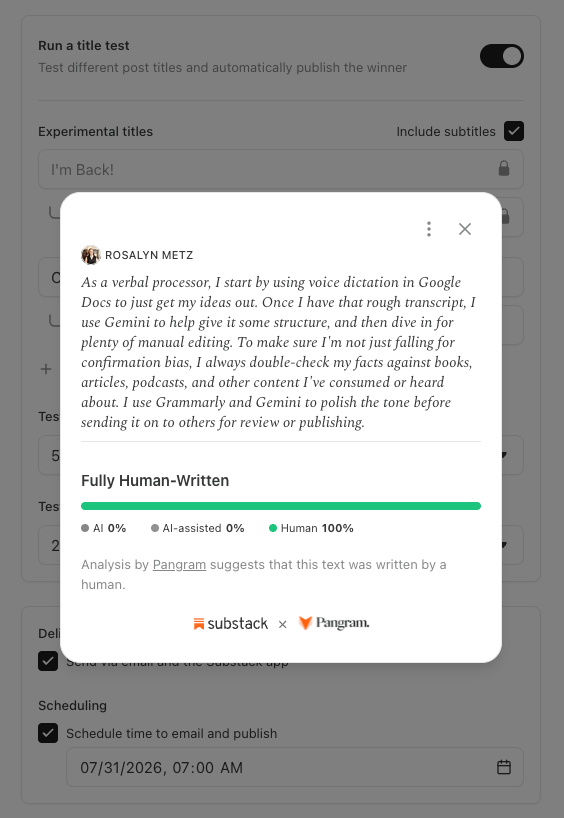
I want to be super clear: AI is a big part of my toolkit, but the ideas and concepts that you read here are fully my own, or I have developed them through conversations with friends and colleagues over the years. Also, this is probably the most meta post I will ever create.
I'M glad you described your writing process. I now realize how difficult it must be to define contemporary writing compared to old fashioned writing.